Have you ever wondered if your air fryer, that counter-top marvel, could do more than just make crispy fries and chicken wings? Most air fryer owners quickly fall in love with its ability to deliver delicious, healthier versions of traditionally fried foods. But what if we told you that this versatile appliance is capable of so much more, transforming into a true kitchen workhorse you never knew you needed? From baking delightful desserts to making perfect hard-boiled eggs, your air fryer is packed with untapped potential. This article will unveil 10 surprising hacks that go beyond basic frying, transforming your air fryer into an indispensable, multi-functional appliance that will revolutionize your cooking routine.
Understanding Your Air Fryer: More Than Just Frying
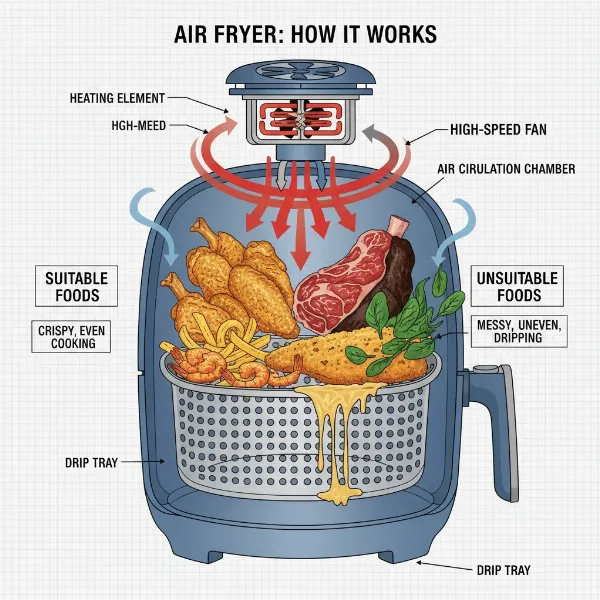
An air fryer is a compact countertop convection oven designed to simulate deep frying without submerging food in oil. It works by circulating hot air (up to 400°F or 200°C) at high speed around your food, thanks to a powerful fan. This rapid, even heating cooks food thoroughly while creating a crisp, golden-brown exterior similar to deep-fried dishes, but with significantly less oil.
Initially gaining popularity as a healthier alternative to deep-fat frying, the air fryer’s appeal quickly expanded due to its efficiency and convenience. Its history is relatively short, emerging as a mainstream kitchen appliance in the late 2000s and early 2010s, quickly becoming a staple in many homes.
Compared to traditional cooking methods, the air fryer offers several distinct advantages. It uses dramatically less oil, leading to healthier meals. Its compact size means it preheats much faster than a conventional oven, saving time and energy. It excels at making food exceptionally crispy and is often easier to clean than deep fryers. However, air fryers do have limitations, primarily their smaller capacity, which might require cooking in batches for larger families. There’s also a slight learning curve to optimize cooking times and temperatures for various foods.
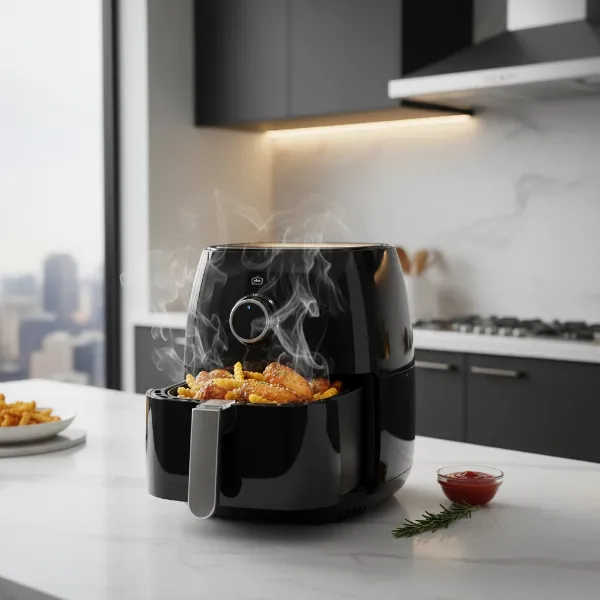 A sleek, modern air fryer on a kitchen counter, circulating hot air to cook various foods.
Unlocking Hidden Potential: 10 Air Fryer Hacks You Didn’t Know You Could Do
Beyond the typical frozen fries and chicken tenders, your air fryer hides a world of culinary possibilities. Prepare to be amazed by these ingenious hacks that will expand your cooking repertoire and simplify your kitchen tasks.
Bake Delicious Desserts and Pastries
|
Our Picks for the Best Air fryer in 2026
As an Amazon Associate I earn from qualifying purchases.
|
||
| Num | Product | Action |
|---|---|---|
| 1 | Ninja - XL Single Basket Air Fryer - 5.5 QT Capacity fits 3lbs of Wings - 5-in-1Air Fry, Roast, Bake,Reheat & Dehydrate -Dishwasher Safe Parts & Recipe Guide - Grey -AF150AMZ |

|
| 2 | Cosori 9-in-1 TurboBlaze Air Fryer 6 Qt, Premium Ceramic Coating, 90°–450°F, Precise Heating for Even Results, Air Fry, Roast, Bake, Broil, Dry, Frozen, Proof, Reheat, Keep Warm, 120V, Dark Gray |
|
| 3 | Ninja - Air Fryer - 4-in-1 Pro Air Fry, Roast, Reheat, Dehydrate - 5QT Capacity fits up to 4lbs of French Fries - 400F Max Temp - Nonstick Basket & Crisper Plate - 120V - Grey - AF141 |
|
| 4 | bella 4Qt Slim Air Fryer, Fits-anywhere™ Kitchenware, EverGood™ Ceramic Nonstick Coating, Adjustable Temperature, 6 Preset Cooking Options, 60 Min Auto Shutoff w Audible Tone, 3.3lb Capacity, Oatmilk |
|
| 5 | Ninja - Air Fryer - 4 QT Capacity - 4-in1 Roast, Crisp, Roast, Reheats, & Dehydrates - Dishwasher Safe Parts - Includes 20 Easy & Healthy Recipes - Compact - Grey - AF101 |
|
| 6 | Ninja Air Fryer, 8 QT DoubleStack 2-Basket, Space Saving Design, Cooks 2lb Chicken Wings, Feeds up to 6 People, 6-in1 Air Fryer, Roast, Bake & More, Easy to Clean, Dishwasher Safe Parts, Black, SL201 |
|
| 7 | Cuisinart Air Fryer Toaster Oven, 1800W, 8-in-1 with Air Fry, Convection, Broil & Warm, 0.6 Cubic Feet, 60-Minute Timer, TOA-70NAS, Stainless Steel |
|
| 8 | Chefman Air Fryer – 6 QT Compact Airfryer for Quick & Easy Meals in Minutes, Features Hi-Fry Technology for Extra Crisp, Touchscreen Controls with 4 Presets, Nonstick & Dishwasher Safe Basket - Black |
|
| 9 | Chefman TurboX 4-in-1 Air Fryer, 5-Quart Airfryer for Extra Crispy Chicken, Fries, Wings, and More, Air Fry, Bake, Reheat, and Frozen Functions, Digital Touch Controls, Dishwasher Safe |
|
| 10 | Ninja Crispi Pro 6-in-1 Glass Air Fryer - 450°F, Nontoxic, 6qt & 2.5qt Containers & Lids - Microwave, Freezer, Dishwasher Safe - Max Crisp, Air Fry, Bake, Roast, Recrisp, Dehydrate -Cyberspace AS101CY |
|
Did you know your air fryer can be a miniature oven? It’s perfect for baking small batches of your favorite treats. You can make everything from individual cakes and fluffy muffins to chocolate chip cookies and even flaky cinnamon rolls from refrigerated dough. The concentrated heat ensures a golden-brown finish and a perfectly cooked interior. When adapting oven recipes, remember to reduce the temperature by about 25-50°F (15-30°C) and keep a close eye on your baked goods, as they will cook faster in the air fryer. Always use oven-safe bakeware that fits comfortably in your air fryer basket, allowing for proper air circulation.
Achieve Perfect Hard-Boiled Eggs Every Time
Forget the boiling pot of water! Making hard-boiled eggs in an air fryer is incredibly simple and consistently delivers perfectly cooked, easy-to-peel results. Simply place your eggs directly into the air fryer basket in a single layer. Preheat your air fryer to 250-300°F (120-150°C) and cook for approximately 12 to 17 minutes, depending on your desired doneness (12-13 minutes for soft-boiled, 15 minutes for medium, and 17 minutes for hard-boiled). Immediately transfer the cooked eggs to an ice bath to stop the cooking process and ensure easy peeling.
Revive Leftovers Like New
Tired of soggy leftovers from the microwave? The air fryer is your secret weapon for bringing yesterday’s meals back to life with incredible crispness. Whether it’s pizza slices, fried chicken, spring rolls, or even roasted vegetables, the circulating hot air prevents sogginess and restores that desirable crispy texture. Your leftovers will taste remarkably close to freshly made, making the air fryer a far superior choice for reheating anything that needs a crunch.
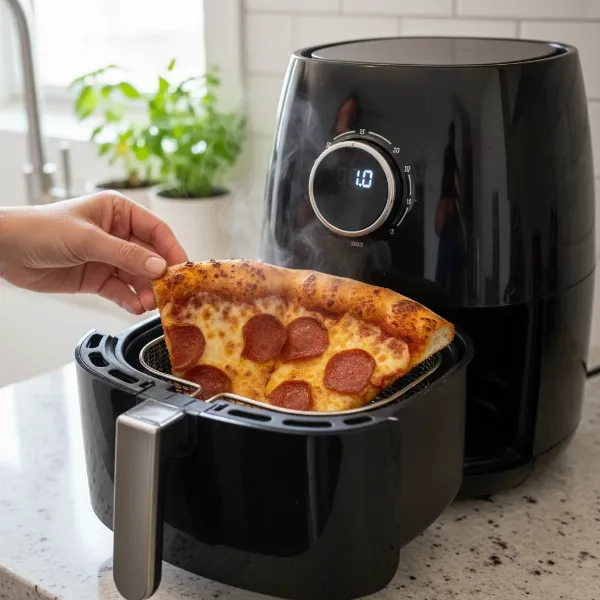 Crispy pizza slice being reheated in an air fryer, restoring its fresh texture.
Toast Bagels, Bread, and Sandwiches
For those mornings when your toaster can’t handle a thick bagel or a large slice of artisanal bread, or if you’re making multiple pieces of toast, your air fryer steps in as a capable alternative. Simply place your bread or bagel halves in the air fryer basket. Set it to “air fry” or “toast” (if available) at around 350-375°F (175-190°C) for 3-5 minutes, checking frequently to prevent burning. It’s also fantastic for making perfectly golden, gooey grilled cheese sandwiches without a frying pan.
Roast Nuts, Seeds, and Crispy Chickpeas
The air fryer’s even heat distribution and compact size make it ideal for roasting small batches of nuts, seeds, or turning canned chickpeas into addictively crispy snacks. Simply toss your desired item with a touch of oil and your favorite seasonings, then air fry at around 350-375°F (175-190°C), shaking the basket every few minutes until golden and crunchy. This method is much more efficient than heating a large oven for a small amount, making healthy snacking easier than ever.
Dehydrate Fruits and Vegetables
Extend the life of your fresh produce and create healthy, homemade snacks by dehydrating them in your air fryer. While it might take a few hours, many air fryer models come with a dedicated “dehydrate” setting or can be set to a very low temperature, around 175°F (80°C). Thinly slice fruits like apples or bananas, or vegetables like kale, and arrange them in a single layer. This hack helps reduce food waste and provides a convenient way to enjoy wholesome, preservative-free dried snacks.
Craft Homemade Tortilla Bowls
Impress your friends and family with homemade, edible tortilla bowls for salads, chili, or tacos. This hack is surprisingly simple. Lightly brush or spray corn or flour tortillas with oil, then carefully press them into small, oven-safe bowls that fit inside your air fryer. Place another small bowl on top to help them hold their shape. Air fry at about 375-400°F (190-200°C) for 4-6 minutes until they are golden and crispy.
Accelerate Banana Ripening
Need ripe bananas for a quick banana bread but your fruit is still green? Your air fryer can speed up the ripening process dramatically. Place whole, unpeeled bananas in the air fryer at 300°F (150°C) for approximately 8-10 minutes. The skins will turn black, and the bananas inside will become soft and sweet, perfect for baking. Let them cool before peeling and using.
Proof Dough for Fluffy Bakes
For home bakers, certain advanced air fryer models offer a “proof” or “warm” setting. This creates a slightly warm, consistent environment perfect for helping bread dough rise. If your air fryer has this feature, it can significantly cut down on proofing time and provide ideal conditions, ensuring your homemade bread and pastries come out perfectly light and fluffy. Check your appliance’s manual for specific instructions.
Cook Frozen Foods Directly
One of the biggest time-savers is the ability to cook many frozen foods directly in the air fryer without the need for thawing. From frozen chicken breasts and fish fillets to various vegetables, the air fryer cooks them efficiently, often yielding a crispier result than traditional oven baking. Just be sure to increase the cooking time compared to thawed food and always use a meat thermometer to ensure poultry and meats reach their safe internal temperature (e.g., 165°F for chicken).
Maximizing Your Air Fryer Experience: Essential Tips and Best Practices
To truly master your air fryer and enjoy consistent, delicious results, integrating these fundamental tips and best practices into your cooking routine is crucial.
Preheat for Optimal Results
Just like a conventional oven, preheating your air fryer for 3-5 minutes to the desired temperature ensures that food starts cooking immediately and evenly. This step is often overlooked but guarantees better crispness and more consistent results, especially for items with short cooking times.
Avoid Overcrowding
The secret to an air fryer’s success is hot air circulation. If you overcrowd the basket, you hinder this circulation, leading to steamed rather than crispy food. Always arrange food in a single layer, ensuring enough space around each piece for the hot air to reach all surfaces. If you’re cooking a large quantity, work in batches.
Use Minimal Oil (Wisely)
While air fryers can cook with little to no oil, a light spray or brush of oil can significantly enhance crispness and flavor. Use a good quality oil sprayer with regular cooking oil (like avocado or olive oil). Avoid aerosol cooking sprays, as their propellants and additives can damage the non-stick coating of your air fryer basket over time.
Shake or Flip Food
To ensure all sides of your food get evenly crispy and cooked, remember to shake the basket or flip items halfway through the cooking process. This redistributes the food, exposing all surfaces to the circulating hot air.
The Bread Slice Hack for Grease
Cooking greasy foods like bacon or sausages can lead to smoke and a messy cleanup. A clever hack is to place a slice of bread directly under the air fryer basket (in the main drawer) before cooking. The bread will absorb excess grease, minimizing smoke and making cleanup significantly easier.
Use Perforated Parchment Paper
For easier cleanup and to prevent sticking, perforated parchment paper liners are a game-changer. Unlike solid parchment paper, which can block airflow, these liners have holes that allow the hot air to circulate freely, ensuring your food still gets crispy while keeping your basket cleaner.
Add Water to Prevent Smoke
If you’re cooking particularly fatty foods and notice smoke, try adding a small amount of water (about 1/4 to 1/2 cup) to the bottom of the air fryer drawer, underneath the basket. This helps to catch dripping grease and prevents it from burning and causing smoke.
Proper Placement of Bakeware/Accessories
Any oven-safe dish made of glass, ceramic, or metal can typically be used in your air fryer, provided it fits and allows for adequate airflow around it. Ensure there’s enough space for the hot air to circulate freely around the sides and top of the dish for even cooking.
Clean Regularly
Maintaining your air fryer is crucial for its longevity and performance. Hand washing the basket and trays is often recommended, even if they are listed as dishwasher-safe, to protect their non-stick coatings. Wipe down the interior of the appliance with a damp cloth after each use once it has cooled to prevent grease buildup.
Air Fryer Buying Guide: Choosing the Right Model for Your Kitchen
Choosing the perfect air fryer can feel daunting with so many options available. Here’s a guide to help you make an informed decision:
Determine Your Needs
Consider how many people you typically cook for. A compact 2-3 quart model is sufficient for singles or couples, while families of four or more will benefit from a larger 5-6 quart capacity or even bigger oven-style air fryers. Also, think about the types of food you’ll be cooking most frequently – some models are better suited for specific tasks.
Consider Key Features
Look for features that enhance usability and versatility. Precise temperature control is essential, as are clear, easy-to-use presets for common foods. Some air fryers offer additional functions like dehydrating, roasting, or even rotisserie. Consider models with digital displays for accuracy, a shake reminder, and components that are easy to remove and clean.
Brand Reputation & Warranty
Reputable brands like Philips, Tefal, Ninja, Cosori, and Instant Pot often offer reliable products with good customer support and warranty coverage. Researching reviews for specific models within these brands can provide valuable insights into their performance and durability. A good warranty offers peace of mind.
Budget & Value
Air fryers vary widely in price. Determine your budget but remember that the cheapest option isn’t always the best value. Invest in a model that balances features, capacity, and brand reliability within your price range. Compare prices from different retailers and look for sales.
Conclusion
The air fryer is a true kitchen powerhouse, capable of far more than its basic reputation suggests. By embracing these 10 unexpected hacks—from baking desserts and proofing dough to making perfect hard-boiled eggs and reviving leftovers—you can unlock a new level of culinary creativity and efficiency. These clever uses, combined with essential tips for optimal performance, transform your air fryer from a simple frying alternative into an indispensable, multi-functional appliance.
So, are you ready to push the boundaries of your air fryer? What unexpected hack will you try first to revolutionize your home cooking?